


Enter Template Details
|
Field Name |
Description |
|
Template ID |
This is a unique ID for the asset Template. This ID gets generated by default. |
|
Template Type |
The system automatically fills this field with the selected template type, such as Generic, Custom, or System. |
|
Name |
Enter a name for the asset template. |
|
Asset Category |
Select an Asset Category from the drop-down list. Select an Asset Category from the dropdown list. |
|
Asset Class |
Select an Asset Class from the drop-down list. The list will be displayed only after you select the Asset Category. Select an Asset Class from the dropdown list. The list will be displayed only after you select the Asset Category. |
|
Asset Sub Class |
Select an Asset Sub Class from the drop-down list. The list will be displayed only after you select the Asset Class. Select an Asset Sub Class from the dropdown list. The list will be displayed only after you select the Asset Class. |
|
Justification |
Enter a justification for creating this Asset Template. |
You can navigate to the next tab only after entering values in the mandatory field of the respective tab.
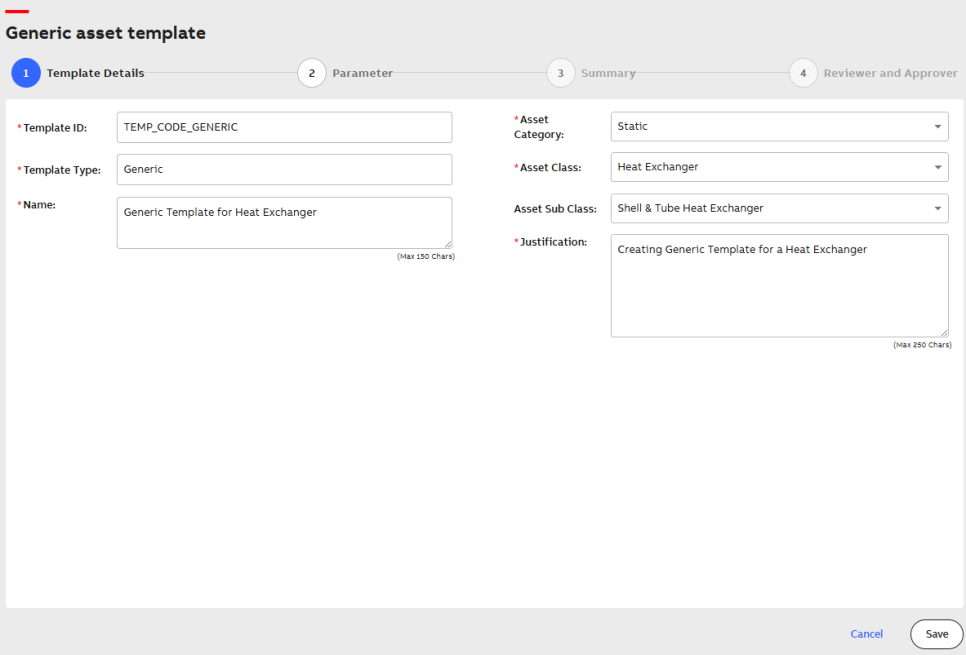
Generic Template Details